


Emergency Call Buttons for Seniors: 2026 Safety Guide
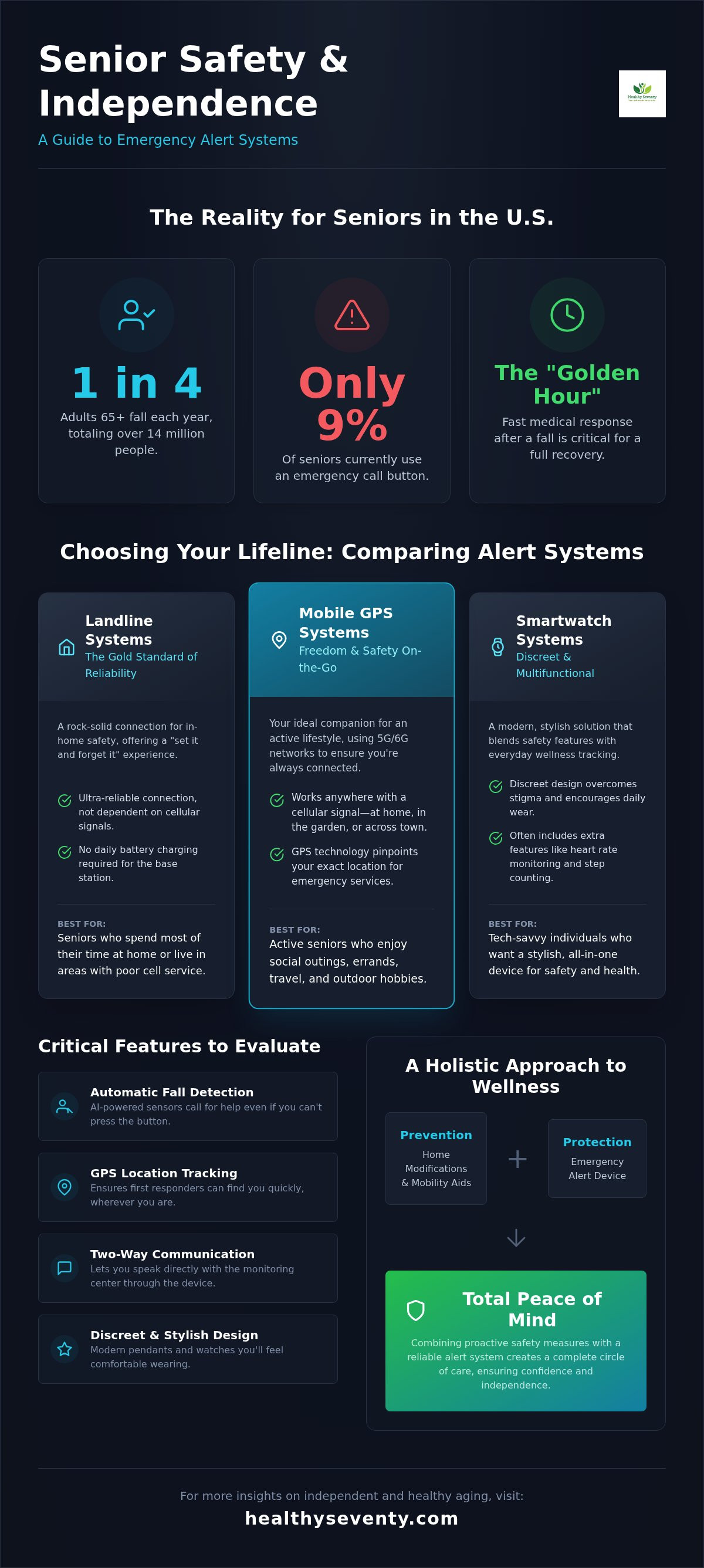
Did you know that approximately one in four adults aged 65 and older in the U.S. falls every year? That is over 14 million people facing a sudden moment that could change their lives, yet the adoption of emergency call buttons for seniors remains surprisingly low at just 9%. You value your independence and the hard earned comfort of your own home, but that nagging worry about being alone during an accident can cast a shadow over your daily vitality. It is a challenge that requires a thoughtful approach to ensure your safety does not come at the expense of your dignity.
It's completely natural to feel overwhelmed by technical jargon like AI powered fall detection or to feel anxious about the long term costs of a subscription. This 2026 safety guide is here to act as your trusted mentor. You'll discover how to select the right alert system to maintain your freedom and ensure lasting peace of mind for your entire family. We'll explore the latest FCC safety standards, compare the reliability of landline systems with the flexibility of mobile GPS, and provide a clear roadmap for understanding the total cost of ownership. By the end, you'll have the confidence to choose a device that blends seamlessly into your lifestyle without ever feeling like a burden.
Table of Contents
Why Emergency Call Buttons are Essential for Independent Aging
A Personal Emergency Response System (PERS) is more than just a piece of technology; it's a lifeline that honors your desire to live on your own terms. Often referred to as emergency call buttons for seniors, these devices serve as a vital bridge between the freedom you've earned and the security your family desires. By providing an immediate connection to trained professionals, a PERS ensures that a minor stumble doesn't turn into a life altering event. It's about maintaining control over your environment while having a backup plan that works as hard as you do.
Speed is everything in a medical crisis. Doctors often speak of the "Golden Hour," which is the critical window of time following an injury where medical intervention is most effective. If a fall occurs, the ability to summon help within seconds significantly improves the chances of a full recovery and a return to your normal routine. This proactive approach shifts the narrative from waiting for an emergency to enjoying daily peace of mind. It isn't just for you; it's a gift of reassurance for your children and grandchildren who want to know you're safe.
The Reality of Aging in Place Safely
The vast majority of older adults prefer to age in the comfort of their own familiar surroundings. However, household hazards like loose rugs, steep stairs, or dimly lit hallways can create hidden risks. Integrating emergency call buttons for seniors into a broader medical alert systems for seniors strategy allows you to mitigate these dangers without sacrificing your autonomy. For those who spend most of their time at home and value consistent reliability, a Landline Personal Emergency Alert Device offers a stable connection that doesn't rely on cellular signals or battery charging schedules.
Who Benefits Most from an Alert Device?
You might wonder if you're "ready" for such a device. The truth is that these tools are for anyone who values vitality and active living. They're especially beneficial for:
Seniors living alone: You can maintain your social schedule and physical hobbies with the confidence that help is always just a button press away.
Individuals with chronic conditions: If you manage vertigo, diabetes, or heart disease, a quick connection to help can prevent complications during a sudden flare up.
Active explorers: Whether you're tending to your garden or walking through the neighborhood, a portable button ensures you're never truly isolated if you need assistance.
Landline vs. Mobile vs. Smartwatch: Comparing Alert Systems
Choosing the right hardware is about matching technology to your unique rhythm of life. It isn't just about finding the newest gadget; it's about selecting a tool that feels natural and dependable in your specific environment. Whether you're a homebody who finds joy in a quiet garden or an adventurer who loves local walking trails, there's a system designed to support your vitality without getting in the way. Modern emergency call buttons for seniors have evolved to offer a variety of form factors, ensuring you don't have to compromise on your lifestyle to stay safe.
The Reliability of Landline Personal Emergency Alert Devices
Despite the rapid growth of cellular technology, landlines remain the gold standard for in-home safety and simplicity. These systems offer a "set it and forget it" experience that many find deeply reassuring. Because the base station plugs directly into your home's existing phone jack, it provides a rock-solid connection that doesn't fluctuate based on signal bars. This is particularly beneficial if you live in a rural area or a home with thick masonry walls that tend to block wireless signals. There's no need to worry about daily battery charging, making it a truly low maintenance solution for consistent peace of mind.
The Freedom of GPS-Enabled Mobile Buttons
If your days are filled with social outings, errands, or travel, a mobile cellular system is your ideal companion. These portable devices use nationwide 5G and emerging 6G networks to ensure you're never out of reach. In 2026, mobile emergency call buttons for seniors have reached new heights in battery efficiency, with many pendants now lasting five to seven days on a single charge. The integrated GPS technology allows dispatchers to pinpoint your exact location within meters. Whether you're at a local park or visiting family out of state, help can find you exactly where you are.
For those who want a more modern aesthetic, smartwatch alerts offer a discreet and stylish alternative. These look like standard fitness trackers but include a dedicated SOS button and two way voice communication. They blend into your wardrobe effortlessly, removing any perceived stigma associated with traditional medical devices. If you want the most comprehensive coverage, hybrid solutions are also available. These systems combine a powerful home base station with a portable GPS pendant, giving you high volume voice clarity inside the house and full protection when you step out the front door. Finding the right fit is easier when you have a partner who understands your needs, so you might consider exploring a Landline Personal Emergency Alert Device if you prioritize a permanent, stable connection in your home.
Critical Features to Evaluate Before You Invest
Choosing between various emergency call buttons for seniors requires looking beyond the plastic casing to the sophisticated technology inside. The best device is one that works flawlessly when your adrenaline is high and your focus is on staying calm. Two way voice communication stands as a cornerstone of this security. It allows you to speak directly to a dispatcher, providing clarity that a simple alarm cannot. Being able to explain that you've simply slipped or that you're experiencing specific symptoms helps the response team send the exact level of assistance you need.
Durability in high risk areas is equally vital. Since many household accidents occur on wet surfaces, your button must feature high level water resistance. You shouldn't have to take it off to shower or bathe, as these are the moments when you are most vulnerable. Additionally, verify the range and signal strength of the unit. Whether you're tending to your backyard garden or retrieving items from a deep basement, the connection to the base station must remain robust and uninterrupted throughout your entire property.
Understanding Automatic Fall Detection Technology
Modern 2026 devices utilize a combination of accelerometers and barometric sensors to identify a fall. Accelerometers measure the speed of a downward movement, while barometric sensors detect sudden changes in air pressure that occur when your body moves closer to the floor. This dual layered approach helps the device distinguish between a genuine fall and the simple act of sitting down quickly. If you already use mobility aids for seniors, this technology provides an essential safety net by acting as a silent observer. While false alarms can happen, dispatchers are trained to check in gently, ensuring you're safe without causing unnecessary alarm.
Battery Life and Charging Logistics
The maintenance requirements of your device should match your daily habits. Landline pendants are often favored because they're "always on" and rarely require individual charging, drawing their strength from the main base station. In contrast, mobile units require a regular charging routine. To make this easier, look for systems that include bedside charging cradles. It's a simple habit that ensures your device is ready to protect you the moment you wake up. Many high quality systems now include automated "low battery" alerts that can be sent directly to your family or caregivers, providing an extra layer of collective oversight for your safety.
Overcoming the Stigma: How to Integrate an Alert Button
Many people hesitate to adopt new technology because they fear it signals a loss of independence. This is the "frailty myth," the incorrect idea that needing a safety net means you're no longer strong. In reality, the most vibrant and intelligent individuals use every tool available to maintain their lifestyle. Modern emergency call buttons for seniors are exactly that: tools for empowerment. Whether you choose a necklace, a wristband, or a discreet belt clip, these devices function like an insurance policy; you hope you never need it, but you're far more confident knowing it's there. Choosing to be prepared is a sign of wisdom, not weakness.
Integrating this technology into your life doesn't have to be a chore. If you're helping a parent transition to using a device, approach the topic as a partnership built on love. Focus on how it provides peace of mind for the whole family, allowing everyone to focus on quality time rather than constant worry. Once the device arrives, make it second nature through regular training. Set a recurring date once a month to press the button and speak with a dispatcher. This ensures the equipment is working and helps you stay calm and familiar with the process so that you can act without hesitation if a real need arises.
Choosing a Design That Matches Your Style
The aesthetic of safety has changed dramatically. In 2026, you can find "jewelry style" pendants that resemble high end silver or gold accessories, blending perfectly with your favorite outfits. Smartwatches have also become a favorite for the modern senior, offering a sleek, tech forward look that hides its emergency features in plain sight. This shift in design provides a significant psychological benefit. When your device looks like a chosen accessory rather than a clinical necessity, you feel prepared and proactive rather than merely protected. You deserve a device that complements your vitality and personal taste.
Making the Device a Part of Your Daily Routine
Success with an alert system depends on consistency. A simple "on in the morning, off at night" habit is the most effective way to ensure you're covered when it matters most. Keep your charging cradle in a prominent spot, like your bedside table, so it's the first thing you see when you wake up. It's also helpful to remember that these buttons aren't just for medical crises. If you're out for a walk and feel unsafe or disoriented, your button is a direct line to someone who can help. To find a reliable, straightforward solution for your home, explore our Landline Personal Emergency Alert Device today.
Beyond the Button: Building a Safer Home for Seniors
True safety isn't just about reacting to a crisis; it's about creating an environment where accidents are less likely to happen. By adopting a "Prevention + Protection" strategy, you combine the security of emergency call buttons for seniors with proactive tools that strengthen your physical stability. Think of your alert device as the final safety net and your daily habits as the primary defense. Following a comprehensive guide for fall prevention for elderly at home ensures that every corner of your living space supports your vitality and independence.
Healthy Seventy focuses on a holistic approach to wellness. We understand that your needs change, and we curate an ecosystem of products designed to grow with you. This means looking at your health from every angle, from the air you breathe to the way you move through your hallway. When your home is optimized for safety, you spend less time worrying about "what if" and more time enjoying the activities that bring you joy. It's about building a foundation that allows you to thrive in your own space for as long as possible.
The Role of Upright Walkers in Fall Prevention
Your posture is your first line of defense against a stumble. Many traditional walkers cause you to hunch over, which shifts your center of gravity and increases trip risks. The VOCIC Upright Walker is designed to help you stand tall and look forward. This upright position improves your gait and builds the confidence needed to stay active. When you move with better balance, the likelihood of needing to use your emergency button decreases significantly. It's a proactive way to extend your independent living years while maintaining the physical strength required for daily tasks.
Creating a Tech-Enabled Safe Haven
A truly safe home leverages modern technology to eliminate common obstacles. Smart lighting with motion sensors can illuminate your path to the kitchen at night, preventing stumbles in the dark. Voice assistants can serve as a secondary backup to your alert system, allowing you to call out for help or control your environment hands free. High quality emergency call buttons for seniors work best when paired with clear pathways and non slip flooring. This integrated approach allows you to live a vibrant lifestyle, knowing you've built a home that is as resilient as you are. You deserve to feel secure in your sanctuary, surrounded by tools that honor your legacy and support your well being.
Embrace a Future of Confidence and Independence
You've discovered that modern emergency call buttons for seniors are far more than reactive gadgets; they're essential tools for a proactive lifestyle. By selecting a system that fits your daily rhythm and focusing on high quality features like water resistance and fall detection, you're taking a significant step toward lasting security. Remember that safety is a holistic journey. Combining your alert device with ergonomic mobility aids and a well organized home creates a foundation where you can truly thrive on your own terms.
Healthy Seventy is dedicated to empowering adults 60+ through expertly researched senior wellness guides and a curated selection of high quality mobility and safety products. We've scoured the latest research to present only the most reliable options, acting as your partner in health. You don't have to make these choices alone. It's time to reclaim your peace of mind and focus on the legacy you're building every day.
Explore our curated selection of safety and mobility essentials at Healthy Seventy
Frequently Asked Questions
How much does a medical alert system typically cost per month in 2026?
Monthly costs for these systems vary depending on whether you choose a basic home unit or a feature-rich mobile device with GPS. Most industry providers offer tiered plans that allow you to select only the safety features you truly need, such as automatic fall detection. It's helpful to consider the total cost of ownership, including any one-time equipment fees or potential discounts for annual billing cycles. This approach ensures you find a solution that fits your wellness budget.
Does Medicare or private insurance cover the cost of emergency call buttons?
Traditional Medicare Part A and Part B typically don't provide coverage for personal emergency response systems as standard benefits. However, some Medicare Advantage plans or private long-term care insurance policies may offer wellness credits or partial reimbursement for fall prevention technology. It's a good idea to contact your specific insurance provider to ask if they recognize these devices as a preventative health tool. Some local community programs may also provide assistance to help seniors maintain their independence.
Can I use an emergency call button if I don't have a landline?
You can absolutely maintain your safety without a traditional home phone line. Many modern emergency call buttons for seniors use built-in cellular technology to connect directly to emergency monitoring centers. These units are ideal for individuals who have transitioned to using only mobile phones or who live in areas where landline maintenance is difficult. If you spend most of your time at home, cellular-based base stations offer the same high-volume voice clarity and reliability as traditional systems.
What happens if I accidentally press the emergency button?
Accidental button presses are a perfectly normal part of the learning process and shouldn't cause you any anxiety. If you trigger an alarm, a trained dispatcher will promptly check in through the two-way speaker to ensure you're safe. Simply tell them it was an accident and that no help is needed. Most companies actually appreciate these brief interactions because they serve as a live test of the equipment and help you stay familiar with the response process during a calm moment.
Is fall detection 100% accurate in detecting every type of fall?
While 2026 sensor technology is more advanced than ever, fall detection is designed as a secondary safety net rather than a perfect guarantee. Sensors use complex algorithms to identify high-impact movements, but they may not detect "slow" falls, such as sliding gently from a chair. You should always attempt to press your button manually if you're conscious and able. Using this technology alongside other proactive tools helps create a comprehensive and reliable safety plan for your daily life.
Do I need to wear the button while I am sleeping or in the shower?
It's essential to wear your device in the shower, as slippery surfaces present a high risk for household accidents. Most high-quality emergency call buttons for seniors feature a waterproof or highly water-resistant design specifically for this purpose. While some users prefer to keep their pendant on a bedside table while sleeping, wearing a wrist-based version ensures you're protected if you need to move around during the night. Consistency is what makes these devices truly effective lifelines for your independence.
Can the emergency dispatcher see my location if I am away from home?
If you're using a mobile alert system, dispatchers can utilize integrated GPS and cellular triangulation to identify your location anywhere in the country. This is a vital feature for seniors who enjoy walking, gardening, or traveling away from their home base. For users with a standard landline unit, the system is tied to your registered home address. Choosing a mobile-enabled device ensures that help can find you even if you're unable to explain exactly where you are in a moment of distress.
Is there a contract required for most senior alert systems?
Many industry leaders have shifted toward flexible, month-to-month service agreements rather than long-term binding contracts. This shift allows you to adjust your level of protection as your health or living situation changes without facing heavy financial penalties. Always look for providers that offer a transparent cancellation policy and a risk-free trial period. This ensures you can integrate the technology into your routine with complete confidence and no hidden long-term obligations, keeping your focus on your vitality.


Comments